
Per visualizzare il Product Key inserito all’atto dell’attivazione del sistema operativo è possibile usare uno script Powershell (o WSH per i computer con XP/2003). Ecco come fare.
Qualora non aveste mai usato uno script powershell comparirebbe quest’errore
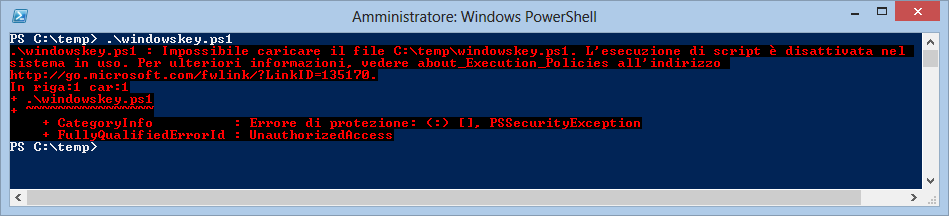
Per ovviare al suddetto errore bisognerà verificare e modificare temporaneamente lo stato della policy di esecuzione degli script con il seguente comando:
get-executionpolicy
il risultato dovrebbe essere restricted (cioè non è possibile eseguire script)
Quindi potete lanciare i seguenti comandi:
set-executionpolicy -bypass
[Lanciare lo script che vedremo in seguito]
set-executionpolicy -restricted (o RemoteSigned, AllSigned o qualsiasi altro rilevato dal primo comando)
ECCO LO SCRIPT IN POWERSHELL:
function Get-WindowsKey {

## function to retrieve the Windows Product Key from any PC

## thanks to by Jakob Bindslet (jakob@bindslet.dk)

param ($targets = ".")

$hklm = 2147483650

$regPath = "Software\Microsoft\Windows NT\CurrentVersion"

$regValue = "DigitalProductId"

Foreach ($target in $targets) {

$productKey = $null

$win32os = $null

$wmi = [WMIClass]"\\$target\root\default:stdRegProv"

$data = $wmi.GetBinaryValue($hklm,$regPath,$regValue)

$binArray = ($data.uValue)[52..66]

$charsArray = "B","C","D","F","G","H","J","K","M","P","Q","R","T","V","W","X","Y","2","3","4","6","7","8","9"

## decrypt base24 encoded binary data

For ($i = 24; $i -ge 0; $i--) {

$k = 0

For ($j = 14; $j -ge 0; $j--) {

$k = $k * 256 -bxor $binArray[$j]

$binArray[$j] = [math]::truncate($k / 24)

$k = $k % 24

}

$productKey = $charsArray[$k] + $productKey

If (($i % 5 -eq 0) -and ($i -ne 0)) {

$productKey = "-" + $productKey

}

}

$win32os = Get-WmiObject Win32_OperatingSystem -computer $target

$obj = New-Object Object

$obj | Add-Member Noteproperty Computer -value $target

$obj | Add-Member Noteproperty Caption -value $win32os.Caption

$obj | Add-Member Noteproperty CSDVersion -value $win32os.CSDVersion

$obj | Add-Member Noteproperty OSArch -value $win32os.OSArchitecture

$obj | Add-Member Noteproperty BuildNumber -value $win32os.BuildNumber

$obj | Add-Member Noteproperty RegisteredTo -value $win32os.RegisteredUser

$obj | Add-Member Noteproperty ProductID -value $win32os.SerialNumber

$obj | Add-Member Noteproperty ProductKey -value $productkey

$obj

}

}
E QUELLO CON WINDOWS SCRIPTING HOST
const HKEY_LOCAL_MACHINE = &H80000002

strKeyPath = "SOFTWARE\Microsoft\Windows NT\CurrentVersion"

strValueName = "DigitalProductId"

strComputer = "."

dim iValues()

Set oReg=GetObject("winmgmts:{impersonationLevel=impersonate}!\\" & _

strComputer & "\root\default:StdRegProv")

oReg.GetBinaryValue HKEY_LOCAL_MACHINE,strKeyPath,strValueName,iValues

Dim arrDPID

arrDPID = Array()

For i = 52 to 66

ReDim Preserve arrDPID( UBound(arrDPID) + 1 )

arrDPID( UBound(arrDPID) ) = iValues(i)

Next

'

Dim arrChars

arrChars = Array("B","C","D","F","G","H","J","K","M","P","Q","R","T","V","W","X","Y","2","3","4","6","7","8","9")
‘
For i = 24 To 0 Step -1
k = 0
For j = 14 To 0 Step -1
k = k * 256 Xor arrDPID(j)
arrDPID(j) = Int(k / 24)
k = k Mod 24
Next
strProductKey = arrChars(k) & strProductKey
‘
If i Mod 5 = 0 And i <> 0 Then strProductKey = “-” & strProductKey
Next
strFinalKey = strProductKey
‘
‘
‘
strComputer = “.”
Set objWMIService = GetObject(“winmgmts:” _
& “{impersonationLevel=impersonate}!\\” & strComputer & “\root\cimv2”)
Set colOperatingSystems = objWMIService.ExecQuery _
(“Select * from Win32_OperatingSystem”)
For Each objOperatingSystem in colOperatingSystems
strOS = objOperatingSystem.Caption
strBuild = objOperatingSystem.BuildNumber
strSerial = objOperatingSystem.SerialNumber
strRegistered = objOperatingSystem.RegisteredUser
Next
Set wshShell=CreateObject(“wscript.shell”)
strPopupMsg = strOS & vbNewLine & vbNewLine
strPopupMsg = strPopupMsg & “Build Number: ” & strBuild & vbNewLine
strPopupMsg = strPopupMsg & “PID: ” & strSerial & vbNewLine & vbNewLine
strPopupMsg = strPopupMsg & “Registered to: ” & strRegistered & vbNewLine & vbNewLine & vbNewLine
strPopupMsg = strPopupMsg & “Your Windows Product Key is:” & vbNewLine & vbNewLine & strFinalKey
strPopupTitle = “Informazioni licenza Microsoft Windows”
wshShell.Popup strPopupMsg,,strPopupTitle,vbCancelOnly+vbinformation
WScript.Quit
ECCO LO SCRIPT IN POWERSHELL PER OFFICE:
function Get-OfficeProductKey {

    param(

    [string[]]$computerName = "."

    )
$productkey = @()
$hklm = 2147483650
$RegPath = "SOFTWARE\Microsoft\Office"
foreach ($computer in $computerName) {
$wmi = [WMIClass]"\\$computer\root\default:stdRegProv"
$subkeys1 = $wmi.EnumKey($hklm,$RegPath)
foreach ($subkey1 in $subkeys1.snames) {
$subkeys2 = $wmi.EnumKey($hklm,"$RegPath\$subkey1")
foreach ($subkey2 in $subkeys2.snames) {
$subkeys3 = $wmi.EnumKey($hklm,"$RegPath\$subkey1\$subkey2")
foreach ($subkey3 in $subkeys3.snames) {
$subkeys4 = $wmi.EnumValues($hklm,"$RegPath\$subkey1\$subkey2\$subkey3")
foreach ($subkey4 in $subkeys4.snames) {
if ($subkey4 -eq "digitalproductid") {
$dataobj = "" | select ComputerName,ProductName,ProductKey
$dataobj.ComputerName = $computer
$productName = $wmi.GetStringValue($hklm,"$RegPath\$subkey1\$subkey2\$subkey3","productname")
$dataobj.ProductName = $productName.sValue
$data = $wmi.GetBinaryValue($hklm,"$RegPath\$subkey1\$subkey2\$subkey3","digitalproductid")
$valueData = ($data.uValue)[52..66]
# decrypt base24 encoded binary data
$productkeysegment = ""
$chars = "BCDFGHJKMPQRTVWXY2346789"
for ($i = 24; $i -ge 0; $i--) {
$r = 0
for ($j = 14; $j -ge 0; $j--) {
$r = ($r * 256) -bxor $valueData[$j]
$valueData[$j] = [math]::Truncate($r / 24)
$r = $r % 24
}
$productkeysegment = $chars[$r] + $productkeysegment
if (($i % 5) -eq 0 -and $i -ne 0) {
$productkeysegment = "-" + $productkeysegment
}
}
$dataobj.$productkeysegment = $productkeysegment
$productkey += $dataobj
}
}
}
}
}
}
$productkey
}
Get-OfficeProductKey
 Sistemisti Senior