


Ecco come fare:
Create uno script con powershell con i parametri indicati nelle prime righe e lanciatelo. Sarà aggiunta alle connessioni VPN dell’utente loggato una nuova voce. Inoltre sul desktop dell’utente sarà creato un documento temporaneo txt contenente username/password della connessione che l’utente potrà salvare in altro modo per poi cancellare il file.
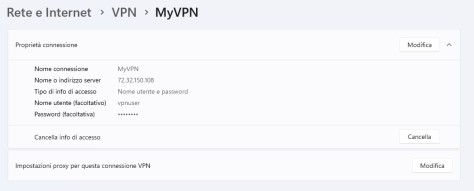
Questa la connessione creata:
E questo lo script:
$ActionType="add" #add, remove, ?
$VPNname="My VPN"
$VPNserverIP="72.32.150.108"
$VPNusername="vpnuser"
$VPNpassword="VPNpass!"
$L2TPpsk="PsK-PaSsWoRd*!"
$NetworkIPandSubnet="192.168.10.0/24"


function ShowInputParameters {
write-host "+--------------- PARAMETERS -----------------+"
write-host  "| Action=$ActionType"(" "*(40-("Action").length-$ActionType.Length))"|"
write-host  "| Name=$VPNname"(" "*(40-("Name").length-$VPNname.Length))"|"
write-host  "| Server=$VPNserverIP"(" "*(40-("Server").length-$VPNserverIP.Length))"|"
write-host  "| Username=$VPNusername"(" "*(40-("Username").length-$VPNusername.Length))"|"
write-host  "| Password=$VPNpassword"(" "*(40-("Password").length-$VPNpassword.Length))"|"
write-host  "| PSK=$L2TPpsk"(" "*(40-("PSK").length-$L2TPpsk.Length))"|"
write-host  "| Network and Subnet=$NetworkIPandSubnet"(" "*(40-("Network and Subnet").length-$NetworkIPandSubnet.Length))"|"
write-host "+--------------------------------------------+"
Write-Host  "`n"
}


function ShowCurrentConfigOld {}
function ShowCurrentConfig {
write-host "`n`n### CURRENT CONFIGURATION ###"
Get-VpnConnection | Select-Object Name,ServerAddress,ConnectionStatus,SplitTunneling,AuthenticationMethod | Sort-Object Name | ft -AutoSize
write-host "`n"
}

    Switch ($ActionType)
    {
    "?" {
                write-host "HELP: Choose [add|remove|?] as ActionType`n"
                write-host "Example add:`n`t*VPN_name`t`t=`tMyVPN`n`t*VPN_server...`t=`t29.55.32.224`n`t*username`t`t=`tvpnuser`n`t*password`t`t=`tmypassword`n`t*Preshared_key`t=`tThePreSHAredKey1!`n`t*Network_and...`t=`t192.168.10.0/24`n`n"
                write-host "Example remove:`n`t*VPN_name`t`t=`tMyVPN`n`t VPN_server...`t=`tx`n`t username`t`t=`tx`n`t password`t`t=`tx`n`t Preshared_key`t=`tx`n`t*Network_and...`t=`t192.168.10.0/24`n`n`t* = mandatory`n"
                ShowCurrentConfig
                exit
                }
    "add" {
            ShowInputParameters
            ShowCurrentConfig
            ## Test if VPNcredentialsHelper module is present
            if (!(get-installedmodule VPNcredentialsHelper -ErrorAction SilentlyContinue)) {install-module VPNcredentialsHelper -Scope CurrentUser -Force -ErrorAction SilentlyContinue}
            ## Test if VPN connection exist
            if (Get-VpnConnection $VPNname -ErrorAction SilentlyContinue) {write-host "### ADDING NEW VPN ###`n`tError: the VPN `"$VPNname`" already exist";exit}
            try {
                write-host "`n### ADD NEW VPN ###"
                write-host "`tAdding new VPN connection $VPNname ..."
                Add-VpnConnection -Name $VPNname -ServerAddress $VPNserverIP -PassThru -TunnelType L2tp -L2tpPsk $L2TPpsk -AuthenticationMethod MSChapv2 -SplitTunneling -RememberCredential -Force -ErrorVariable $ErroreAddVPN | out-null
                write-host "`t>VPN added"
                write-host "`tAdding username/password for connection $VPNname ..."
                $resultaddcredential=Set-VpnConnectionUsernamePassword -connectionname $VPNname -username $VPNusername -password $VPNpassword
                if ($resultaddcredential) {
                    write-host "`t>added credential for user $VPNusername"
                    $DesktopLocation=(Get-ItemProperty -Path 'HKCU:\Software\Microsoft\Windows\CurrentVersion\Explorer\User Shell Folders').Desktop
                    $CredentialFilePath=$DesktopLocation+"\credenziali VPN "+$VPNname+".txt"
                    ("Username=$VPNusername","Password=$VPNpassword") | Out-File $CredentialFilePath -Force
                    } else {
                    write-host "`t>Cannot add credential for user $VPNusername"
                    }
                }
            catch {if ($ErroreAddVPN) {write-host "`tERROR: "; write-host "`t------";write-host -nonewline "`t";$ErroreAddVPN}}
            finally { write-host "### END NEW VPN ###`n"}

            try {
                write-host "`n### ADD NEW ROUTE ###"
                write-host "`tAdding new route to $NetworkIP to connection $VPNname ..."
                Add-VpnConnectionRoute -ConnectionName $VPNname -DestinationPrefix $NetworkIPandSubnet –PassThru -ErrorVariable ErroreRoute | Out-Null
                write-host "`t>Route $NetworkIPandSubnet added"
            }
            catch {if ($ErroreRoute) {write-host "`tERROR: "; write-host "`t------";write-host -nonewline "`t";$ErroreRoute}}
            finally { write-host "### END NEW ROUTE ###`n"}
            ShowCurrentConfig
            }

    "remove" {
                ShowInputParameters
                ## Test if VPN connection exist
                if ((Get-VpnConnection $VPNname -ErrorAction SilentlyContinue) -eq $null)
                    {
                    write-host "### REMOVE VPN ###`n`tError: the VPN `"$VPNname`" not exist"
                    ShowCurrentConfig
                    exit
                    }
                rasdial $VPNname /DISCONNECT | Out-Null
                ShowCurrentConfig
            try {
                write-host "`n### REMOVE ROUTE ###"
                write-host "`tdeleting route to $NetworkIPandSubnet to connection $VPNname ..."
                remove-VpnConnectionRoute -ConnectionName $VPNname -DestinationPrefix $NetworkIPandSubnet -ErrorVariable ErroreremoveRoute
                write-host "`t>Route removed"
                }
            catch {if ($ErroreremoveRoute) {write-host "`tERROR: "; write-host "`t------";write-host -nonewline "`t";$ErroreremoveRoute}}
            finally {write-host "### END REMOVE ROUTE ###`n"}

            try {
                write-host "`n### REMOVE VPN ###"
                write-host "`tdeleting VPN connection $VPNname ..."
                remove-VpnConnection -Name $VPNname -Force -ErrorVariable ErroreremoveVPN
                write-host "`t>VPN removed"
                }
            catch {if ($ErroreremoveVPN) {write-host "`tERROR: "; write-host "`t------";write-host -nonewline "`t";$ErroreremoveVPN}}
            finally {write-host "### END REMOVE VPN ###`n";ShowCurrentConfig}
             }
    default {write-host "ERRORE: azione sconosciuta"}
    }
.
.
.
.
.
.
.
.
.
.
.
 Sistemisti Senior